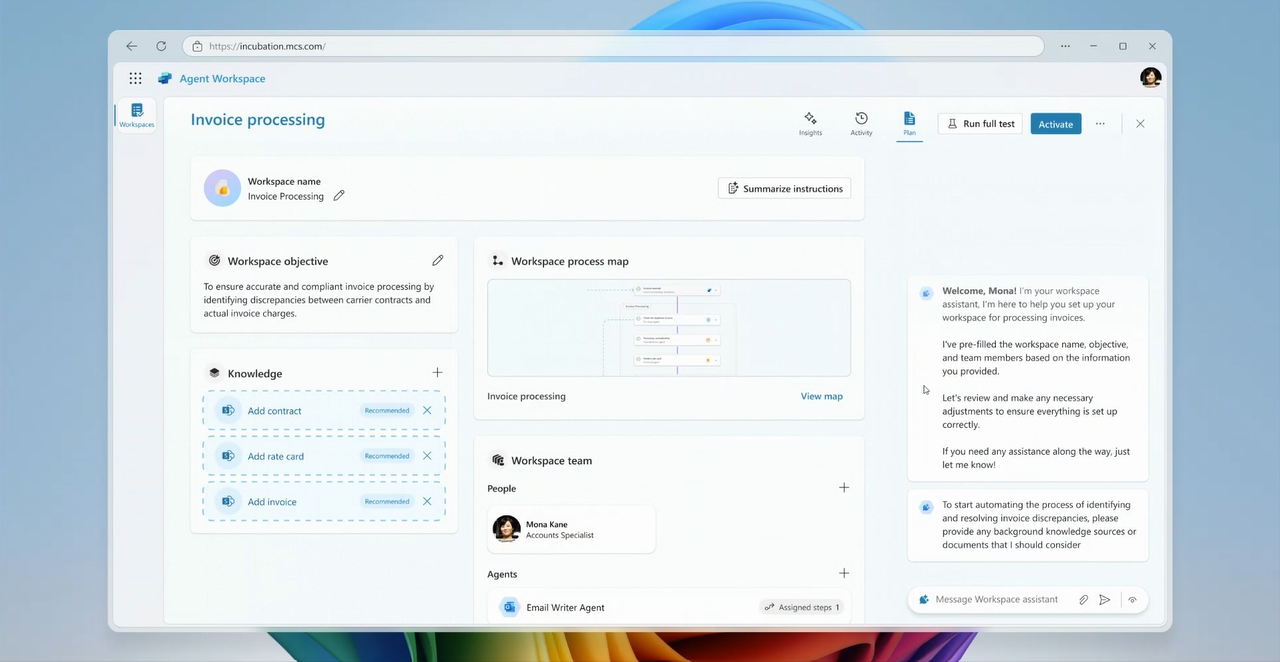
Meet Mona Kane, our Fortune 500 logistics manager persona. Grounded in real customer research and validated through direct engagement.
Shaping Microsoft’s Multi-Agent Future: How an Incubation Project Influenced Product Strategy Across Teams
Reduced invoice processing friction for Fortune 500 companies while establishing the design foundation for agentic AI experiences across Microsoft’s Copilot Studio platform.
The Challenge
In early 2024, Microsoft’s Copilot Studio team faced a strategic question: How do we move beyond single-agent assistants to orchestrated, multi-agent systems that handle complex enterprise workflows?
The answer wasn’t just about adding features. It required reimagining how users create, train, and manage AI agents that work together seamlessly. More critically, we needed to prove this vision resonated with real enterprise needs before committing engineering resources.
As Design Project Manager, I was tasked with leading a four-month incubation effort to explore this possibility. My mandate was clear but challenging: build a compelling proof-of-concept that could influence product strategy, validate it with an actual Fortune 500 customer, and present it to executive leadership—all without overthinking the potential or introducing feature creep.
My Role
Design Project Manager | 4-month incubation project
I orchestrated this effort across three critical dimensions:
Strategic Leadership
- Defined the end-to-end narrative strategy and storyline
- Identified and engaged industry advisors and customer stakeholders
- Managed weekly team cadence and decision-making
- Determined project scope to prevent feature creep
Hands-On Craft
- Designed the AI-powered agent conversation interface (the core “teaching” experience)
- Organized and sequenced all screens for animation
- Built animations, crafted voiceover, and produced final presentation videos
- Partnered closely with interaction designers on the clickable prototype
Relationship Building
- Established direct connection with Fortune 500 logistics manager
- Coordinated with industry advisors to validate scenario accuracy
- Collaborated with my manager to push the concept deeper
- Led team of 4 interaction/visual designers and 1 user researcher
The Approach: From Research to Executive Presentation
Phase 1: Finding the Right Problem
We started broad, exploring multiple automation scenarios across industries. But breadth wasn’t the goal. Depth and believability were. I took the lead on identifying invoice processing for shipping logistics as our north star scenario. Why? Three reasons:
- Real pain, real money: Our Fortune 500 customer was manually processing invoices from contracted carriers, losing $200M annually to overcharges (5% of $4B in shipping costs)
- Complex enough to matter: The workflow required multiple specialized agents (duplicate detection, taxonomy normalization, contract validation, discrepancy flagging)
- Validated by experts: Industry advisors confirmed this was a widespread, high-value problem. I personally reached out to supply chain advisors and customer engagement specialists, which led to direct access to the logistics manager who became our validation partner throughout the project. This wasn’t just research. It was building the credibility we’d need when presenting to executives.
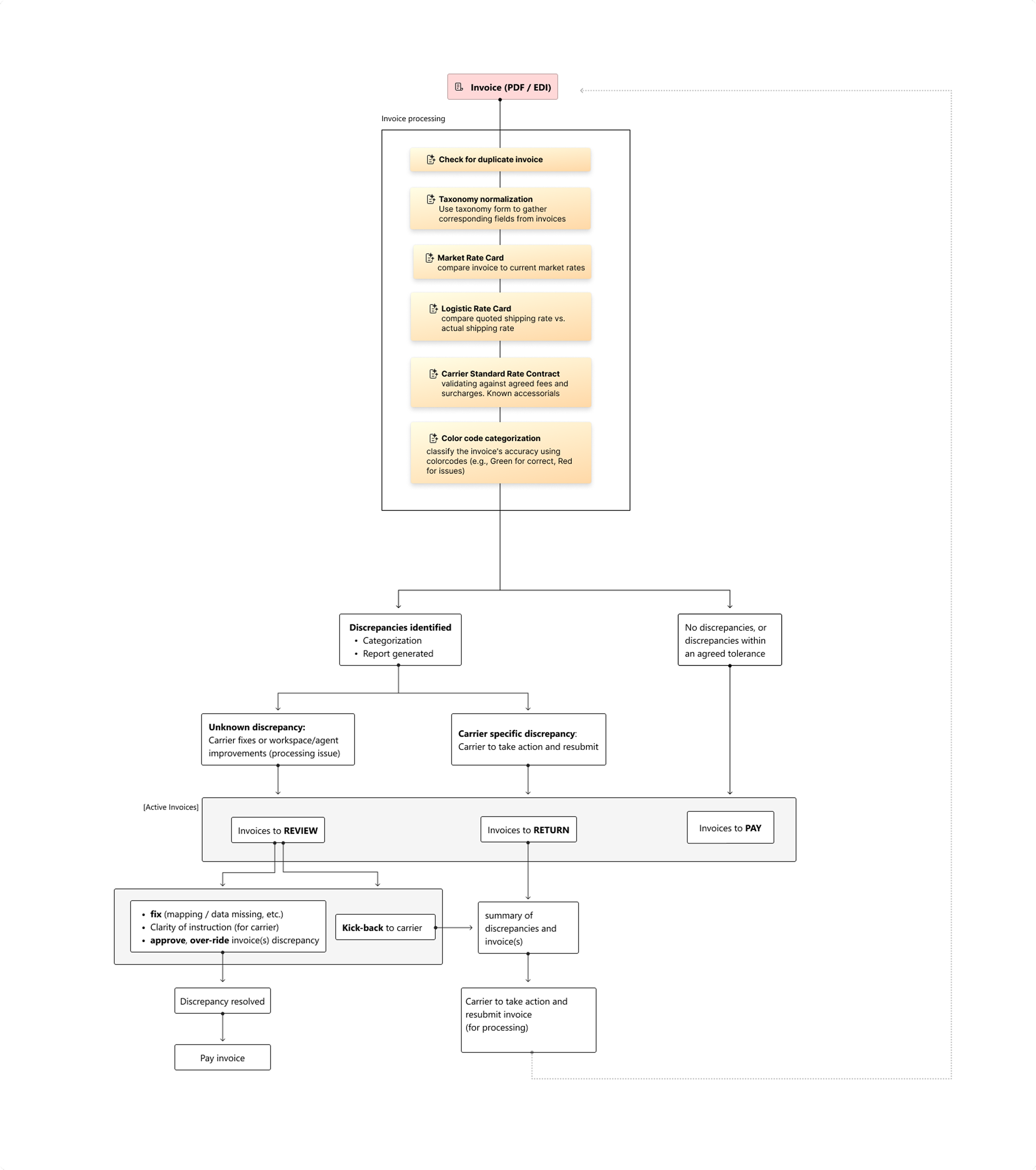
The complete agent workflow, from invoice ingestion to discrepancy resolution. This diagram became our team’s north star and a key artifact in executive presentations.
Phase 2: Designing the “Teaching” Experience
The breakthrough insight: Users shouldn’t need to understand AI architecture to build multi-agent systems. They should just describe their process, and the system should do the intelligent work of decomposing it into specialized agents.
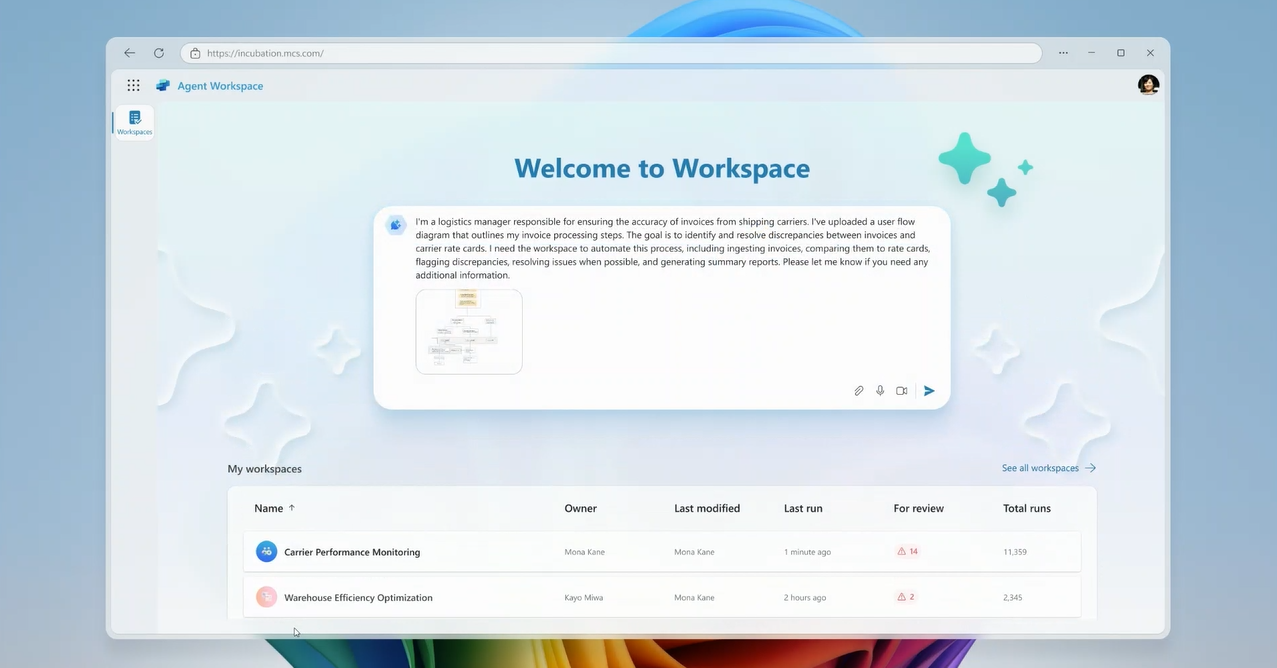
I took ownership of designing the conversational AI interface where users “teach” the system their workflow. This wasn’t a traditional chatbot. It was a guided, collaborative dialogue where:
- The AI asks clarifying questions (“What happens if a duplicate is found?”)
- Users provide natural language instructions, not code
- The system translates intent into agent logic transparently
- Users can test and refine as they go
Designing this required balancing simplicity with power. Too simple, and it wouldn’t handle edge cases. Too complex, and we’d lose our core promise: “Focus on your process, not on learning AI.”
I used AI (Copilot) extensively here, not just to explore design ideas, but to craft the actual conversational prompts and response patterns that would feel natural and confidence-building.
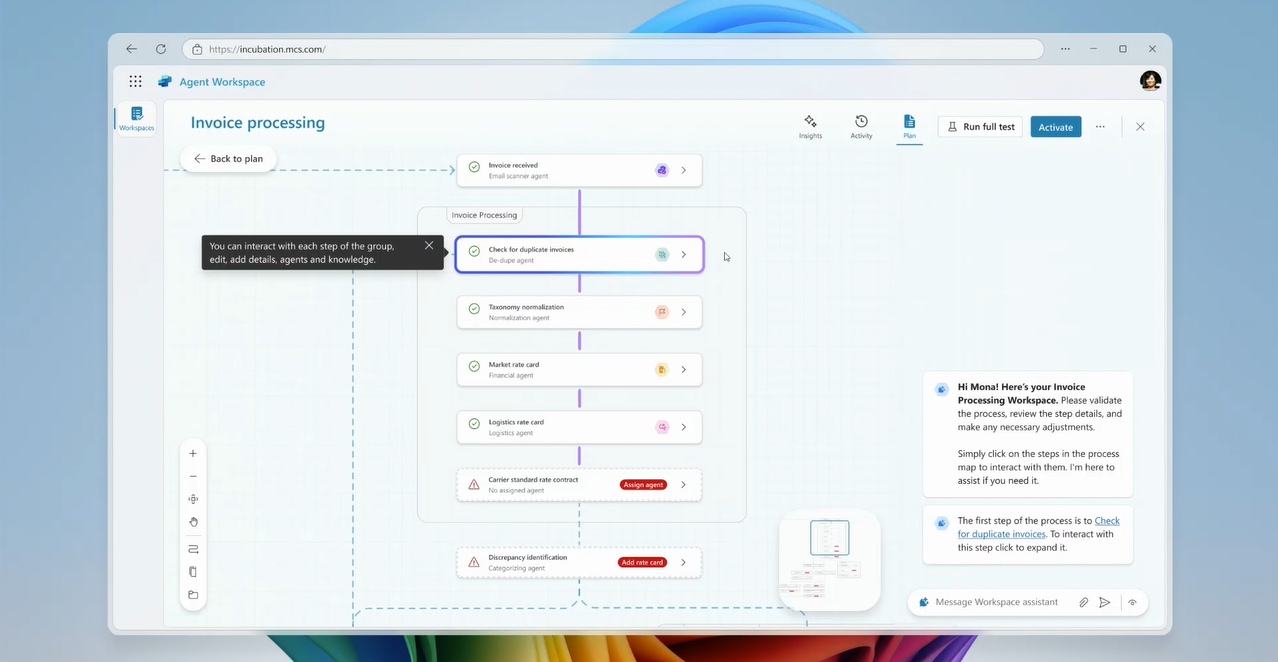
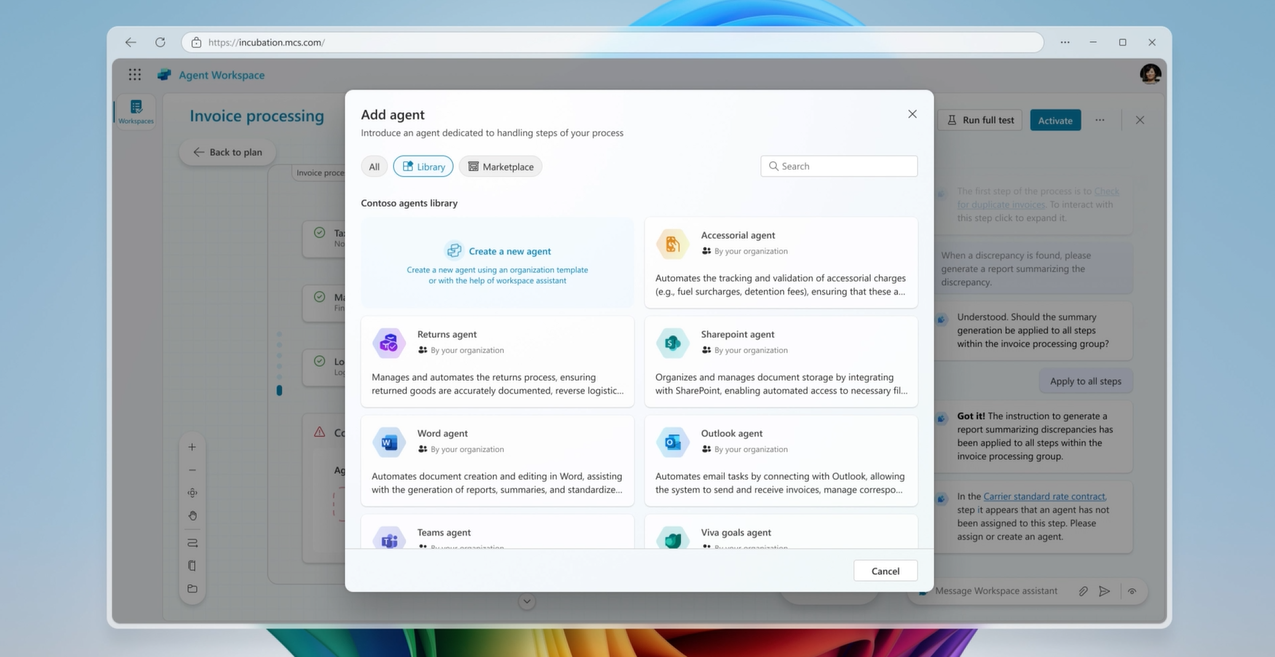
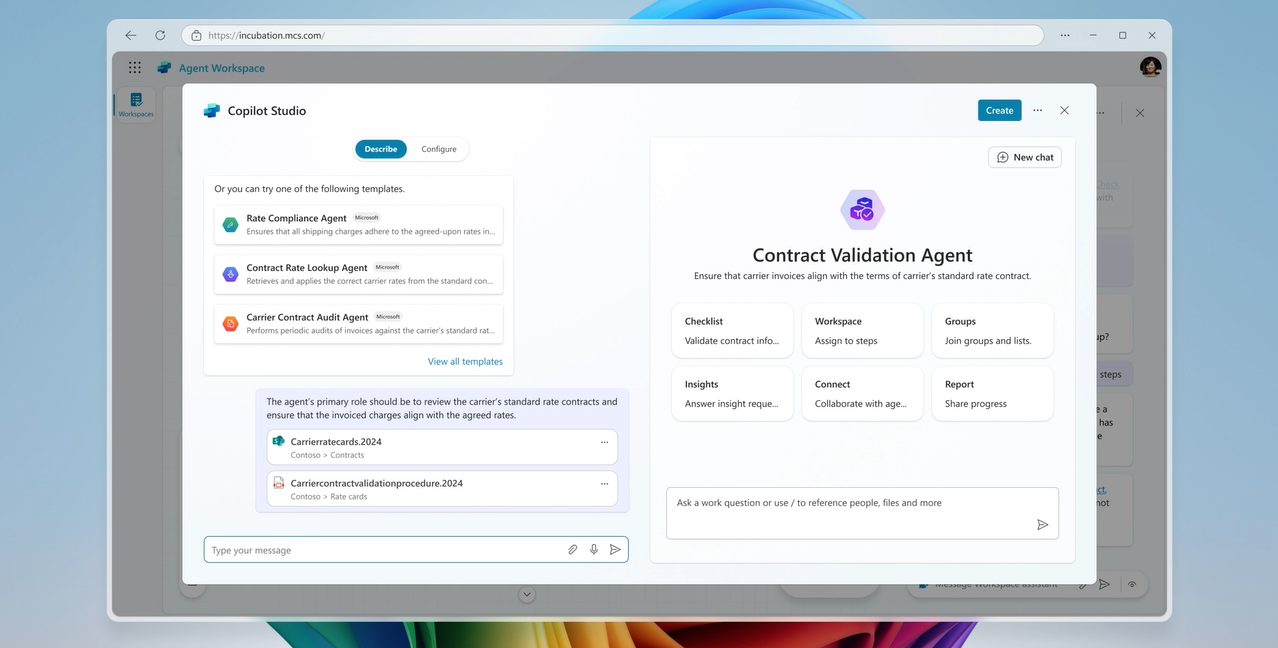
The creation flow, from initial setup to process mapping to agent configuration. Each step builds user confidence while gathering the intelligence needed to automate correctly.
Phase 3: Proving It Works
Concepts are nice. Working demonstrations are convincing.
I led the effort to bring this vision to life through high-fidelity prototypes and animated videos. This meant:
Organizing the chaos: With dozens of screens designed by four different designers, I created the sequencing and information architecture that would tell a coherent story.
Building the animations: I partnered with the lead interaction designer to animate each section, ensuring transitions felt intuitive and the AI’s “thinking” was visible without being overwhelming.
Crafting the narrative: Using Copilot, I developed the voiceover script that would guide viewers through the experience, not just explaining features, but telling Mona’s story of transformation from manual processor to strategic analyst.
Producing the final videos: I assembled everything into two presentation videos: one focused on creation (how users build agent workspaces), the other on execution (how the system handles invoices and surfaces insights).
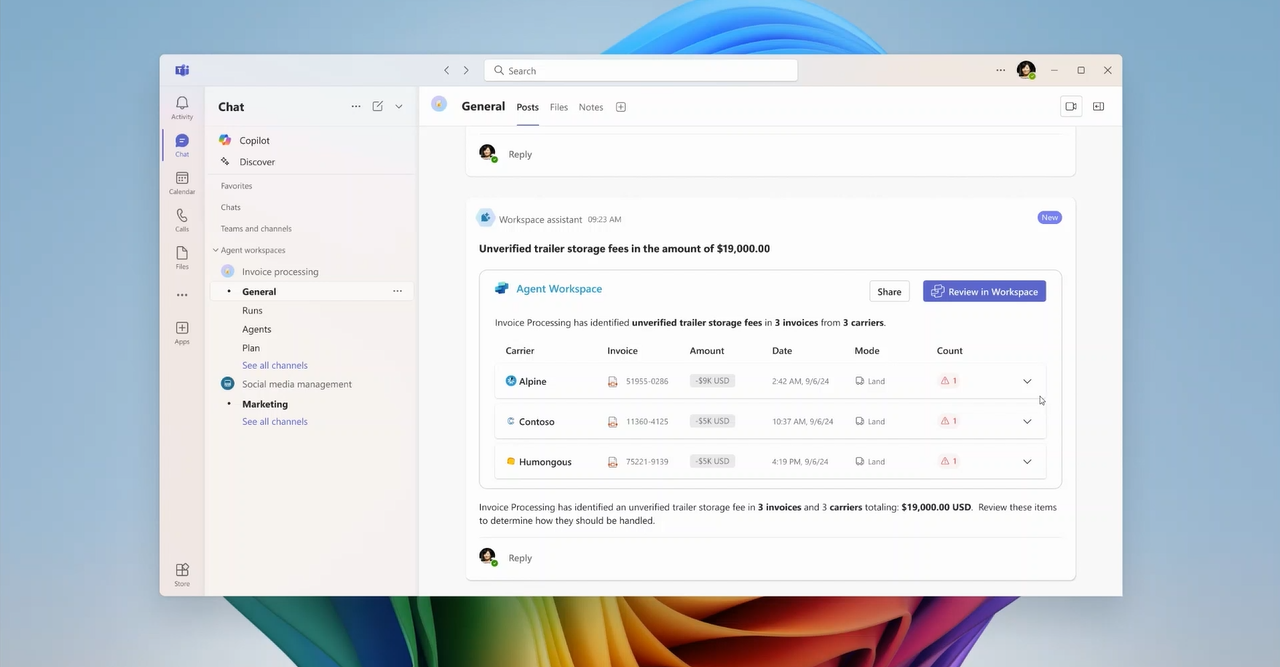
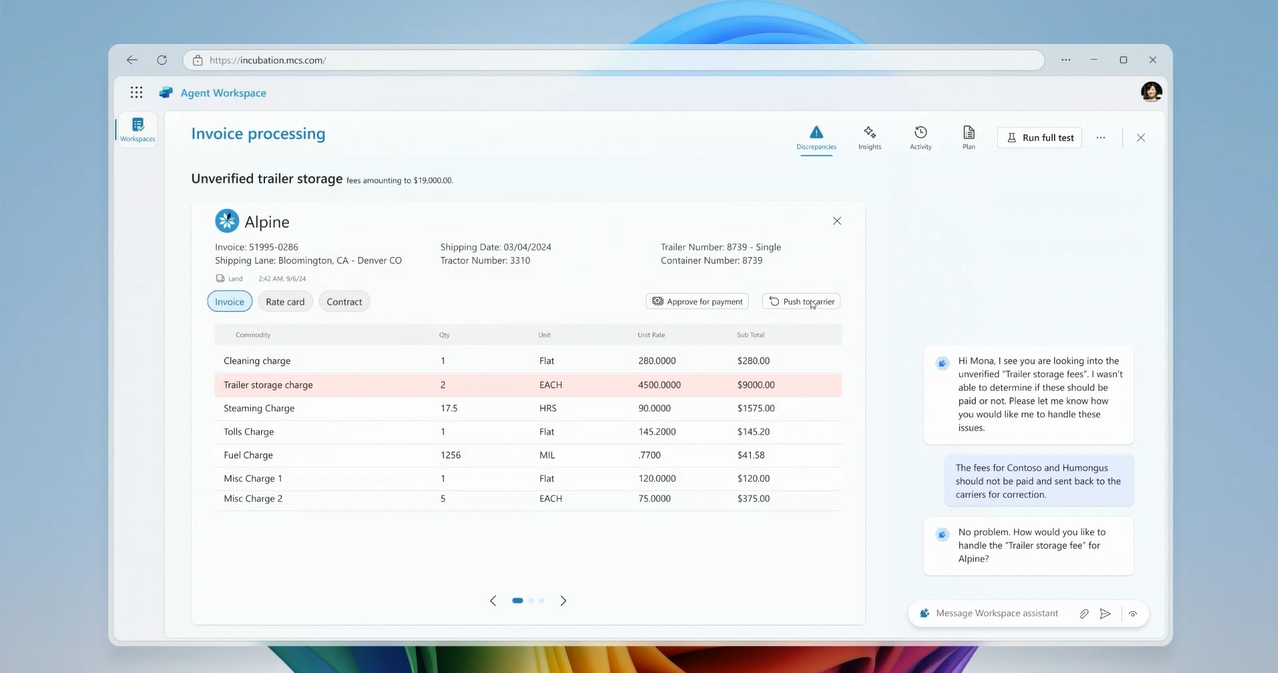
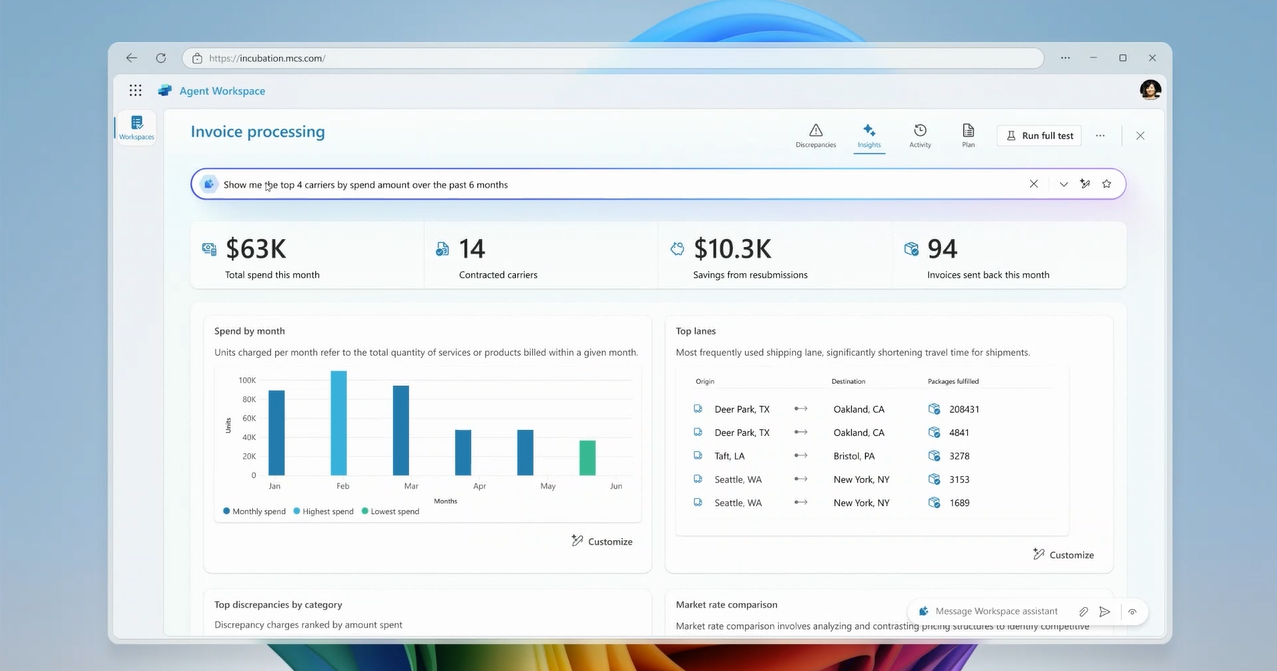
The workspace in action: identifying discrepancies, managing exceptions, and surfacing strategic insights. This moved Mona from “invoice checker” to “negotiation strategist.”
Phase 4: Validation and Stakeholder Alignment
Throughout the project, I maintained a dual feedback loop:
External validation: Regular check-ins with our Fortune 500 customer and industry advisors ensured our scenario was accurate and our solution was viable. Their eventual endorsement gave our executive presentation credibility.
Internal alignment: Weekly team reviews, critiques, and task assignments kept us moving forward without losing sight of the bigger picture. When the team wanted to add more features, I made the call to wrap it. We had enough to prove the concept. More would just dilute the message.
The Result: Influence Across the Organization
Let me be honest: The full concept didn’t ship as a packaged solution. Roadmap realities and competing priorities meant the work was deconstructed.
But here’s what did happen, and why it mattered:
- Core agentic capabilities shipped over two quarters (agent creation, training workflows, exception handling patterns)
- Other Microsoft product teams adopted our design patterns for multi-agent experiences they were building
- Executive leadership used our videos when presenting Copilot Studio’s future vision to customers
- Industry advisors and customer engagement teams showcased the concepts to prospects, validating market demand
The real win wasn’t a feature. It was establishing a design foundation and strategic narrative that influenced how multiple teams thought about agentic AI.
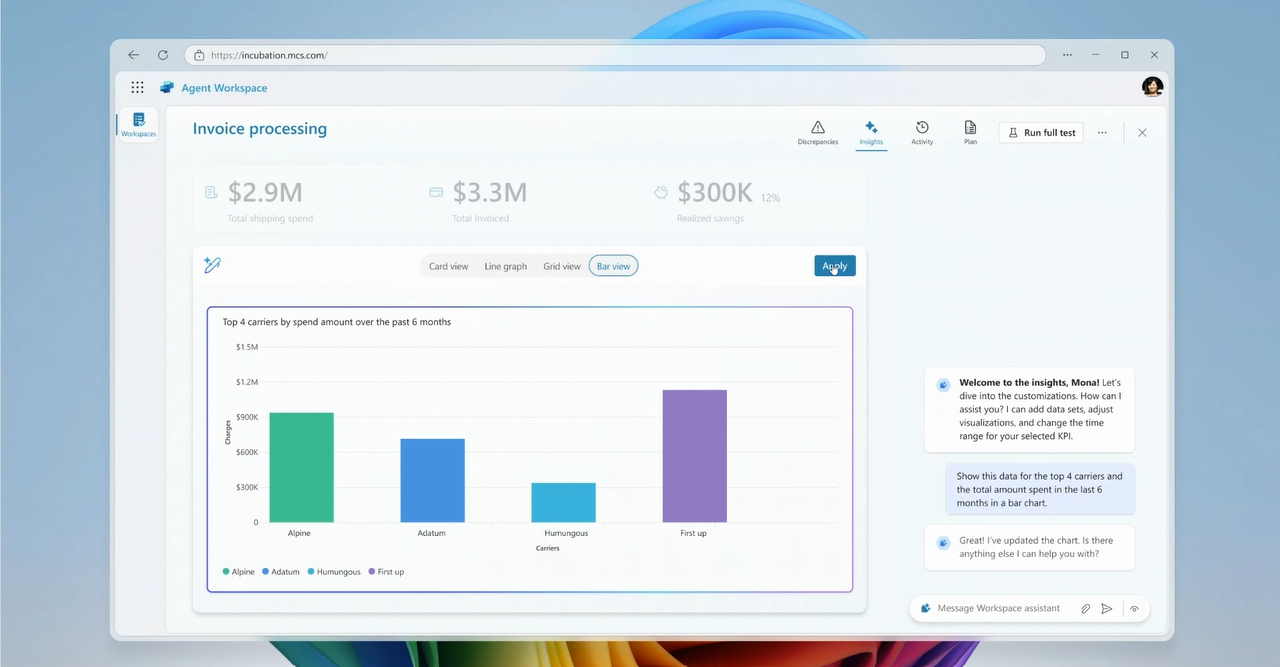
Projected $107.3K in savings from a single workspace. The concept demonstrated how AI-powered exception handling could create measurable business value.
What Made This Work
Looking back, three things made this project successful:
1. Strategic Clarity
I kept the team focused on one question: “Does this make executives believe multi-agent systems are the future?” Every design decision, every scenario choice, every animation detail was in service of that goal.
2. AI as a Strategic Partner
I didn’t just design AI experiences. I used AI (Copilot) to accelerate strategy development, narrative crafting, and content creation. This let me move faster and think bigger than I could have alone.
3. Credibility Through Relationships
By bringing in industry advisors and real customers early, I ensured our work wasn’t just beautiful. It was believable. That credibility carried weight in executive rooms.
Key Takeaway
Virtual workers are most effective when they augment, not replace, human effort.
This principle guided our design and proved true in our impact. We didn’t eliminate the logistics manager’s job. We elevated it. Mona went from manually checking invoices to strategically negotiating contracts armed with data-driven insights.
Similarly, this incubation project didn’t produce a shipped product. It elevated the conversation about what Copilot Studio could become. Sometimes, that’s the more important outcome.
Project Credits
Team: 4 Interaction & Visual Designers, 1 User Researcher, 1 Design Manager
Duration: 4 months (internal incubation)
My Role: Design Project Manager (Strategy, Design, Production, Stakeholder Management)
Deliverables: Executive presentation videos, high-fidelity prototypes, validated customer scenario, design system patterns adopted across teams